
A small flower in front. A huge bouquet behind you.
My Moon My Man AI Video Generator
The My Moon My Man AI Video Generator turns one photo into a 10-second oil-painting video: you kneel to pick a small flower, while Jesus stands behind you hiding a large pastel bouquet. Share it on TikTok, Instagram Reels or YouTube Shorts.
Watch the original performance.
See a My Moon My Man video with its input photos.
How to make a My Moon My Man AI video
Add your photos.
Upload the photos requested by this template. Follow the labels and fill every required slot.
Choose your settings.
Choose from the available video options and review the credits before generating.
Generate and download.
Generate your video, watch the result and download the MP4. Find it again in your library.
What is the My Moon My Man AI Video Generator?
The My Moon My Man AI Video Generator paints one photo into a 10-second oil-painting scene: you kneel to pick a small flower, and Jesus stands behind you with a large pastel bouquet hidden at his back.
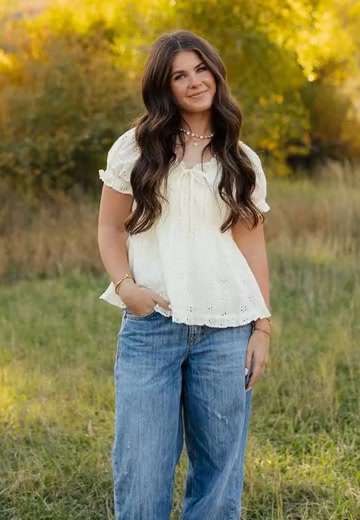
Use one clear photo of an adult, with the face visible. The painting style, the pose, the standing figure and the bouquet come from the template. This is a short painted scene, not a long photo slideshow.
The creation panel defaults to 10 seconds, a 9:16 frame, Standard 480p quality and original sound, and you can switch to HD 720p. You do not need to film the scene or write a prompt. Watch the result, download the MP4 and review it before you post.
Your My Moon My Man video.
Your way to pay.
Seedance 2.5, ByteDance’s advanced AI video model, generates your video. A 15-second template video costs 100 credits in Standard or 150 in HD.
If the person in your paid video clearly doesn’t resemble your uploaded photo, email us for one free remake with the same photo, template, resolution and duration.
100 Credits
Make your own My Moon My Man videos.
$9.90
1 Standard video
- 100 credits added to your balance
- One-time payment. No subscription.
- Purchased credits never expire
- Download your video, ready to share
150 Credits
Make your own My Moon My Man videos.
$14.90
1 Standard video
- 150 credits added to your balance
- One-time payment. No subscription.
- Purchased credits never expire
- Download your video, ready to share
My Moon My Man AI Video Generator FAQs
What is the My Moon My Man trend?
The My Moon My Man trend is a soft oil painting set to the song of the same name: you kneel to pick a small flower, while Jesus stands behind you hiding a huge pastel bouquet.
What is the My Moon My Man AI Video Generator?
The My Moon My Man AI Video Generator turns one photo into a 10-second painted version of that scene. You can explore this and other photo-to-video templates on Nuzza AI.
What is the best My Moon My Man AI Video Generator?
Different tools suit different workflows. Nuzza AI provides a ready-made My Moon My Man template that paints the 10-second scene from one photo, without drawing the bouquet or writing a prompt.
How does the AI My Moon My Man generator on Nuzza AI work?
Add your photo in the labeled slots, choose the duration, aspect ratio, quality and sound shown in the creation panel, then generate. The template follows the My Moon My Man reference while your photo supply who appears in it. When generation finishes, watch the result on the page and download the MP4.
What photos can I upload to Nuzza AI’s My Moon My Man generator?
Add one required photo of an adult, with the face clearly visible in good light. A waist-up or full-body shot works well. Avoid a blurry face, heavy sunglasses, or a group photo. Only use a photo of yourself or of an adult who agreed.
Can I customize my My Moon My Man video on Nuzza AI?
Yes. You can choose a length from 4 to 10 seconds, plus the aspect ratio, and Standard 480p or HD 720p quality in the creation panel, and you can keep the original sound or make a silent video. The Official painting is a 3:4 portrait; the creation panel defaults to 9:16 and also offers 1:1 and 16:9. The clip is a 10-second painted scene. Prompt entry stays off for this template.
Is Nuzza AI’s My Moon My Man video generator free?
New users receive 10 credits when they sign up for Nuzza AI, and those credits can be used for this My Moon My Man template. A default Standard video uses 100 credits, and HD uses 150 credits, so the welcome credits are not enough for one default video. If you need more credits, check the available plans.
How long does Nuzza AI’s My Moon My Man AI video maker take?
Generation time varies with the selected settings and current processing demand. Follow the task status on the page while your video is being created. Once it finishes, you can watch and download the result and find it again in your Nuzza AI library.
Will my My Moon My Man video look like me?
The template aims to keep your face and hair recognizable in the painted kneeling figure. Clear photos help, but an oil-painting style will soften skin and edges. Watch the finished clip before sharing it.
How do I download and share my My Moon My Man video from Nuzza AI?
You can browse this page without an account. Generating and downloading a video requires one. When generation finishes, open Your result to watch and download the MP4. The video is also saved in your Nuzza AI library under the same account. You can then upload the downloaded file to the social platform you want to use.
Make it your own.
Ready for your My Moon My Man AI video?
Create your own version with Nuzza AI.
Make my My Moon My Man video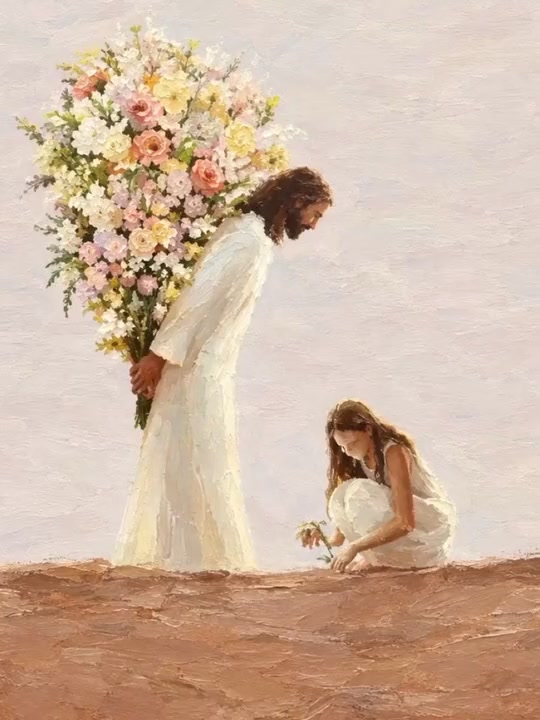
Nuzza AI