
Your photo, a 15s dinosaur-hill reveal.
Mountain Dinosaur AI Video Generator
The Mountain Dinosaur AI Video Generator turns one adult photo into a 15-second wide video of the November 2026 dinosaur-hill reveal: you stand on a mossy rise in a misty flower meadow, the camera pulls back, the rise is a giant dinosaur's head, its eye opens, and it lifts you into the sky, with the clip's own sound of wind and birds. Share it on TikTok, Instagram Reels or YouTube Shorts.
Watch the original performance.
See a Mountain Dinosaur video with its input photos.
How to make a Mountain Dinosaur AI video
Add your photos.
Upload the photos requested by this template. Follow the labels and fill every required slot.
Choose your settings.
Choose from the available video options and review the credits before generating.
Generate and download.
Generate your video, watch the result and download the MP4. Find it again in your library.
What is the Mountain Dinosaur AI Video Generator?
The Mountain Dinosaur AI Video Generator recreates the November 2026 dinosaur-hill reveal. An adult stands on a mossy rise in a misty flower meadow, the camera pulls back, the rise is a giant dinosaur's head, its eye opens, and it lifts them into the sky, with the clip's own sound of wind and birds.
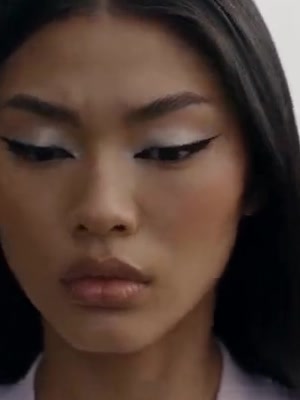
Use one photo of an adult who agreed, ideally from the knees up or head to toes, with the face, hair and clothes in view, because the clip has a close-up of the face and also shows the whole body on the dinosaur. Clothes can come from the photo. Do not upload photos of children.
The creation panel defaults to 15 seconds, a 16:9 frame, Standard 480p quality and original sound, and you can switch to HD 720p. You do not need to film the scene or write a prompt. Watch the result, download the MP4 and review it before you post.
Your Mountain Dinosaur video.
Your way to pay.
50 Credits
Make your own Mountain Dinosaur videos.
$6.90
1 Standard video
- 50 credits added to your balance
- One-time payment. No subscription.
- Purchased credits never expire
- Download your video, ready to share
100 Credits
Make your own Mountain Dinosaur videos.
$11.90
2 Standard videos or 1 HD video
- 100 credits added to your balance
- One-time payment. No subscription.
- Purchased credits never expire
- Download your video, ready to share
200 Credits
Make your own Mountain Dinosaur videos.
$19.90
4 Standard videos or 2 HD videos
- 200 credits added to your balance
- One-time payment. No subscription.
- Purchased credits never expire
- Download your video, ready to share
Mountain Dinosaur AI Video Generator FAQs
What is the Mountain Dinosaur trend?
The Mountain Dinosaur trend, also called The hill is a dinosaur or I thought it was a hill, is a short-video format that spread in November 2026. Someone climbs a mossy rise in a flower meadow, the camera pulls back, and the rise is a giant dinosaur's head that wakes and lifts them into the sky. People remake it with a photo of themselves.
What is the Mountain Dinosaur AI Video Generator?
The Mountain Dinosaur AI Video Generator turns one adult photo into a wide 15-second video of that dinosaur-hill reveal. Your photo is the person on the dinosaur. The clip keeps the stand on the rise, the pullback, the eye opening, the lift and the sound of wind and birds. You can explore this and other photo-to-video templates on Nuzza AI.
What is the best Mountain Dinosaur AI Video Generator?
Different tools suit different workflows. Nuzza AI provides a ready-made Mountain Dinosaur template that puts your photo into the misty-meadow dinosaur-hill reveal without filming a giant animal, timing the pullback or writing a prompt. Upload your photo in the labeled position, choose the available settings, and create your own version.
How does the AI Mountain Dinosaur generator on Nuzza AI work?
Add your photo in the labeled slots, choose the duration, aspect ratio, quality and sound shown in the creation panel, then generate. The template follows the Mountain Dinosaur reference while your photo supply who appears in it. When generation finishes, watch the result on the page and download the MP4.
What photos can I upload to Nuzza AI’s Mountain Dinosaur generator?
Use one sharp, well-lit photo of an adult who agreed, with a clearly readable face, from the knees up or head to toes. Hair, build and clothes should be in view, because the clip has a close-up of the face and also shows the whole body standing and kneeling on the dinosaur. Avoid heavy blur, filters, or extra people in the frame. Only use a photo of an adult who agreed. Do not upload photos of children.
Can I customize my Mountain Dinosaur video on Nuzza AI?
Yes. You can choose a length from 4 to 15 seconds, the aspect ratio, and Standard 480p or HD 720p quality in the creation panel, and keep the original sound or make a silent video. The default 16:9 frame matches the original clip, and your photo decides who stands on the dinosaur. The sound option keeps the clip's own wind and birds. Prompt entry stays off for this template.
Is Nuzza AI’s Mountain Dinosaur video generator free?
Yes. New users receive free credits when they sign up for Nuzza AI, and these credits can be used toward Mountain Dinosaur video generation. Each video requires credits based on the selected settings. If you need more credits to cover a generation, check the available plans.
How long does Nuzza AI’s Mountain Dinosaur AI video maker take?
Generation time varies with the selected settings and current processing demand. Follow the task status on the page while your video is being created. Once it finishes, you can watch and download the result and find it again in your Nuzza AI library.
Will my Mountain Dinosaur video look like me?
The template aims to keep your recognizable face, hair and clothes through the stand on the rise, the face close-up, the kneel and the lift. Clothes can come from your photo. Clear, well-lit photos help, but AI can change fine details from frame to frame. Watch the finished clip before sharing it.
How do I download and share my Mountain Dinosaur video from Nuzza AI?
When generation finishes, open Your result to watch and download the MP4. The video is also saved in your Nuzza AI library under the same account. You can then upload the downloaded file to the social platform you want to use.
Make it your own.
Ready for your Mountain Dinosaur AI video?
Create your own version with Nuzza AI.
Make my Mountain Dinosaur video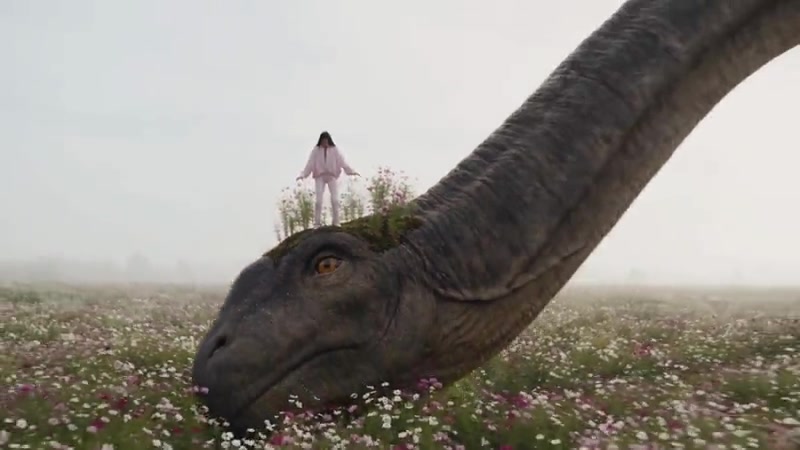
Nuzza AI