
Rewind your camera roll.
80s AI Video Generator
The 80s AI Video Generator brings your photos into a VHS-style home movie, with retro outfits, a roller rink and a warm outdoor ending. Preview a nostalgic short and choose the people or pets for your own throwback.
Watch the original performance.
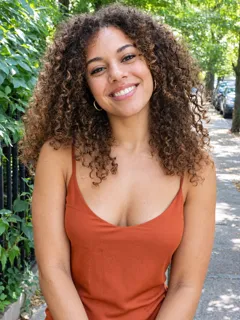
See a 80s video with its input photos.
How to make a 80s AI video
Add your photos.
Upload the photos requested by this template. Follow the labels and fill every required slot.
Choose your settings.
Choose from the available video options and review the credits before generating.
Generate and download.
Generate your video, watch the result and download the MP4. Find it again in your library.
What is the 80s AI Video Generator?
80s AI Video Generator focuses on a retro VHS-style home movie with 1980s scenes and a date stamp. The sample moves from getting ready with big hair and a bright jacket to a roller rink and a golden-hour wave. Rounded tape-like framing, soft detail and an orange date stamp give it the look of an old home movie.
Add a clear photo for the main person or pet. The second photo is optional and can provide a partner, friend or another pet for a paired version. Keep each subject separate and easy to recognize.
Use the nostalgic look for a retro portrait, a couple memory or a playful throwback post. The VHS texture and changing scenes carry the mood; the supplied photos give the memory its cast.
80s AI Video Generator FAQs
What is the 80s trend?
The sample moves from getting ready with big hair and a bright jacket to a roller rink and a golden-hour wave. Rounded tape-like framing, soft detail and an orange date stamp give it the look of an old home movie.
What is the 80s AI Video Generator?
The 80s AI Video Generator is a photo-based template for a retro VHS-style home movie with 1980s scenes and a date stamp. It brings an effect preview, matching input-photo guidance and video settings together on Nuzza AI.
What is the best 80s AI Video Generator?
Different tools suit different workflows. Nuzza AI brings the 80s preview and its photo inputs together in one page, so you can understand the effect before preparing your own version. Look for a clear example, suitable input guidance and the settings you need.
How does the 80s AI generator on Nuzza AI work?
Follow the labeled photo slots, choose the available settings and use the creation button when it is enabled. For 80s, the target is a retro VHS-style home movie with 1980s scenes and a date stamp. Watch and download your result when generation finishes.
What photos can I use with Nuzza AI’s 80s generator?
Add a clear photo for the main person or pet. The second photo is optional and can provide a partner, friend or another pet for a paired version. Keep each subject separate and easy to recognize.
Can I customize my 80s video on Nuzza AI?
The creation panel shows the available length, shape, quality and sound settings. Settings for a future generation do not change the fixed example shown beside its input photos.
Is Nuzza AI’s 80s video generator free?
Yes. New users receive free credits when they sign up for Nuzza AI, and credits can be used toward available video generation. The required credits depend on the selected settings. If you need more credits, explore the available plans.
How long does Nuzza AI’s 80s AI video maker take?
When creation is enabled, generation time depends on the selected settings and current processing demand. Follow the task status on the page rather than relying on a fixed completion time. The preview can be watched independently of any generation.
Will my 80s video preserve my subject’s appearance?
The effect intentionally changes clothes, hairstyles, surroundings and image texture to create a retro look. Facial identity is the reference, but the result is a stylized AI interpretation rather than restored historical footage.
How do I download and share my 80s video from Nuzza AI?
After an available generation finishes, open Your result to watch and download the MP4. Your generated video is also saved in your account library. You can then upload the file to your preferred social platform.
Make it your own.
Ready for your 80s AI video?
Create your own version with Nuzza AI.
Make my 80s video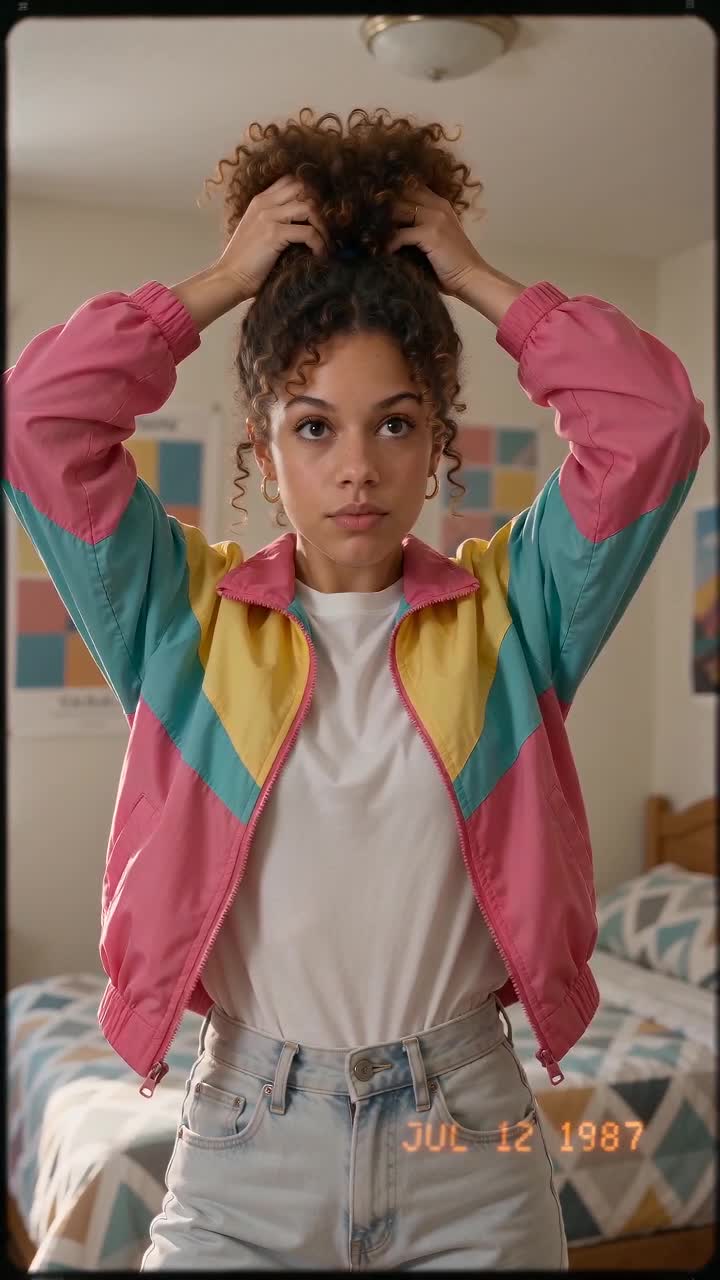
Nuzza AI