
Stay calm. Let the car fly.
Car Jump AI Video Generator
The Car Jump AI Video Generator brings your subject into a desert stunt scene where the subject stays seated as an off-roader flies overhead and lands beside the chair in a cloud of dust. Explore the paired example and create a short clip for your social posts.
Watch the original performance.
See a Car Jump video with its input photos.

How to make a Car Jump AI video
Add your photos.
Upload the photos requested by this template. Follow the labels and fill every required slot.
Choose your settings.
Choose from the available video options and review the credits before generating.
Generate and download.
Generate your video, watch the result and download the MP4. Find it again in your library.
What is the Car Jump AI Video Generator?
The Car Jump AI Video Generator follows this concept: The Car Jump format contrasts a calm seated subject with an outsized stunt. A car launches from the ridge behind the chair, passes overhead and lands nearby while the subject barely reacts.
The setting and car supply the action. Your input supplies the person or subject on the chair, and the preview shows a complete example of the jump, overhead view and landing.
The scene is AI-generated rather than a real stunt filmed with the subject. The appearance should stay recognizable, but hands, vehicle geometry, dust and spatial relationships can vary. Use the example as a guide to the scene and share only a finished result you are happy with.
Car Jump AI Video Generator FAQs
What is the Car Jump trend?
The Car Jump format contrasts a calm seated subject with an outsized stunt. A car launches from the ridge behind the chair, passes overhead and lands nearby while the subject barely reacts.
What is the Car Jump AI Video Generator?
The Car Jump AI Video Generator is a photo-based template for a cinematic desert jump. It combines labeled subject inputs with a prepared scene and movement concept. Explore this and other photo-to-video templates on Nuzza AI.
What is the best Car Jump AI Video Generator?
Different tools suit different workflows. Nuzza AI organizes the Car Jump effect around a reference clip, a paired example and labeled inputs, making it easier to understand the scene before creating your own version. Choose a workflow that fits the subject and result you want.
How does Nuzza AI’s Car Jump AI generator work?
The workflow starts with the photos requested by the template, followed by the available video settings. The prepared scene guides the effect while your inputs supply the subjects. The example on this page shows a cinematic desert jump; check the creation panel for current availability.
What photos can I upload to Nuzza AI’s Car Jump generator?
Use one clear photo for the seated subject. A second input can represent a companion when that version is available; keep each subject in a separate image with recognizable features.
Can I customize my Car Jump video on Nuzza AI?
The setting and car supply the action. Your input supplies the person or subject on the chair, and the preview shows a complete example of the jump, overhead view and landing. Use the settings actually offered in the creation panel for format, quality and sound; not every visual detail is a separate option.
Is Nuzza AI’s Car Jump video generator free?
Yes. New users receive free credits when they sign up for Nuzza AI. Video creation uses credits according to the selected settings, and more credits are available through the available plans. Check the creation panel for this template’s current availability.
How long does the Car Jump AI video maker on Nuzza AI take?
Processing time varies with the selected settings and current demand. When generation is available, the task status shows its progress and the completed video can be found in your account library. A preview’s running time is not an estimate of generation time.
Will my Car Jump video preserve the subjects in my photos?
The scene is AI-generated rather than a real stunt filmed with the subject. The appearance should stay recognizable, but hands, vehicle geometry, dust and spatial relationships can vary.
How do I download and share my Car Jump video from Nuzza AI?
When your own generation is complete, open Your result to watch and download the MP4. It is also saved in your account library. You can upload the downloaded file to your preferred social platform; the previews on this page are examples, not your personal result.
Make it your own.
Ready for your Car Jump AI video?
Create your own version with Nuzza AI.
Make my Car Jump video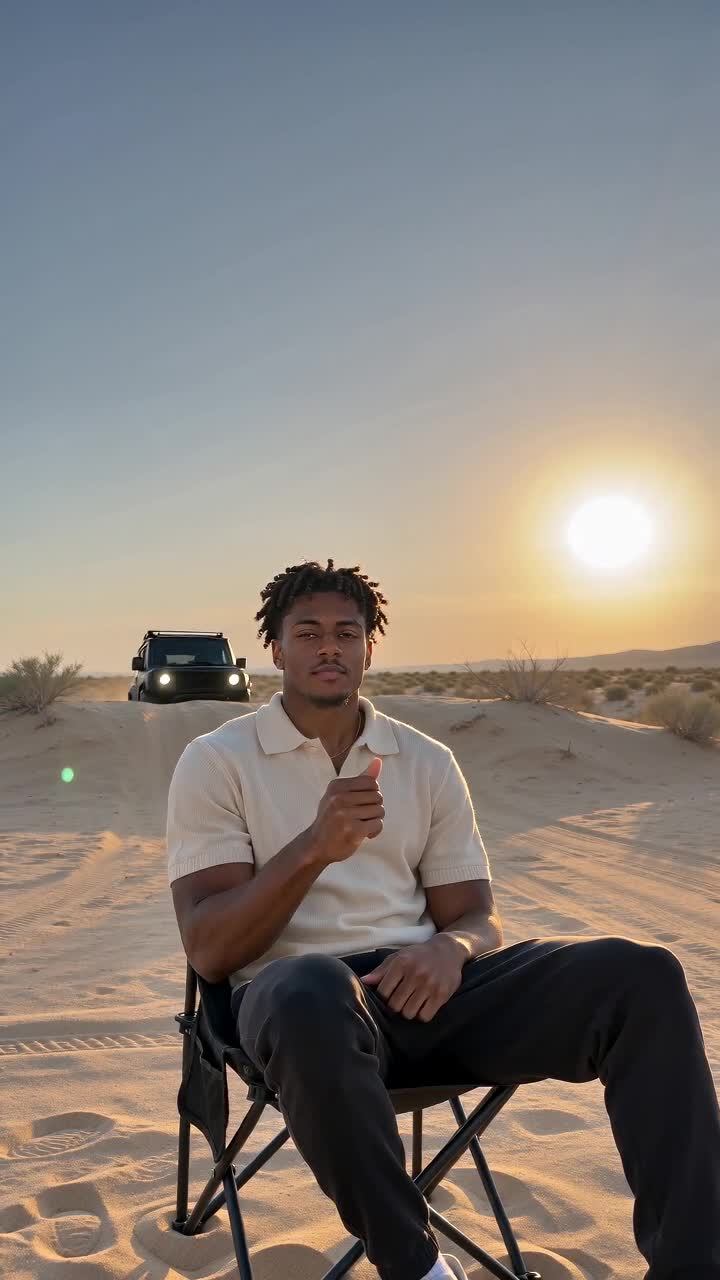
Nuzza AI